What you gained directly and what went to the portals. Every month, no spreadsheets.
The financial overview in your website admin adds up occupancy, revenue and estimated commission across every booking source. We are preparing it for all clients at no extra charge.
Coming soon. We switch it on in your website admin, nothing to install.
- Occupancy by month
- Revenue and average price per night
- Direct vs. via portals
- Estimated commission by source
Two numbers
What you want to know at the end of the month
One number pleases, the other motivates. Both come from the bookings already in your admin and from the commission rate you set for each portal yourself.
Gained from direct bookings
+ €950
direct revenue × portal rate. That is what commission would have taken if the same nights had come through a portal.
Lost to commission
− €1,173
portal revenue × commission rate, plus VAT on commission if you are not registered for VAT.
An example, not your figures Example: 6 bookings via Booking.com worth €6,360, 15% commission and 23% VAT on commission. Your figures will differ.
Preview
This is what it looks like in the admin
A sample property with made-up guests and figures. Your numbers will differ; the layout is the same on desktop and mobile.
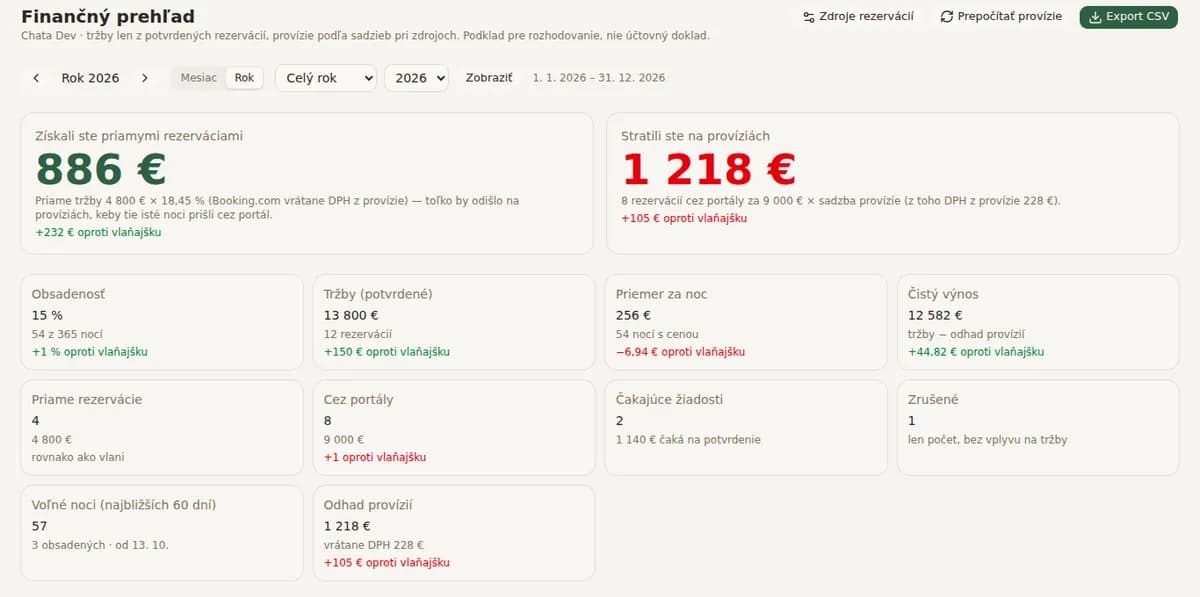
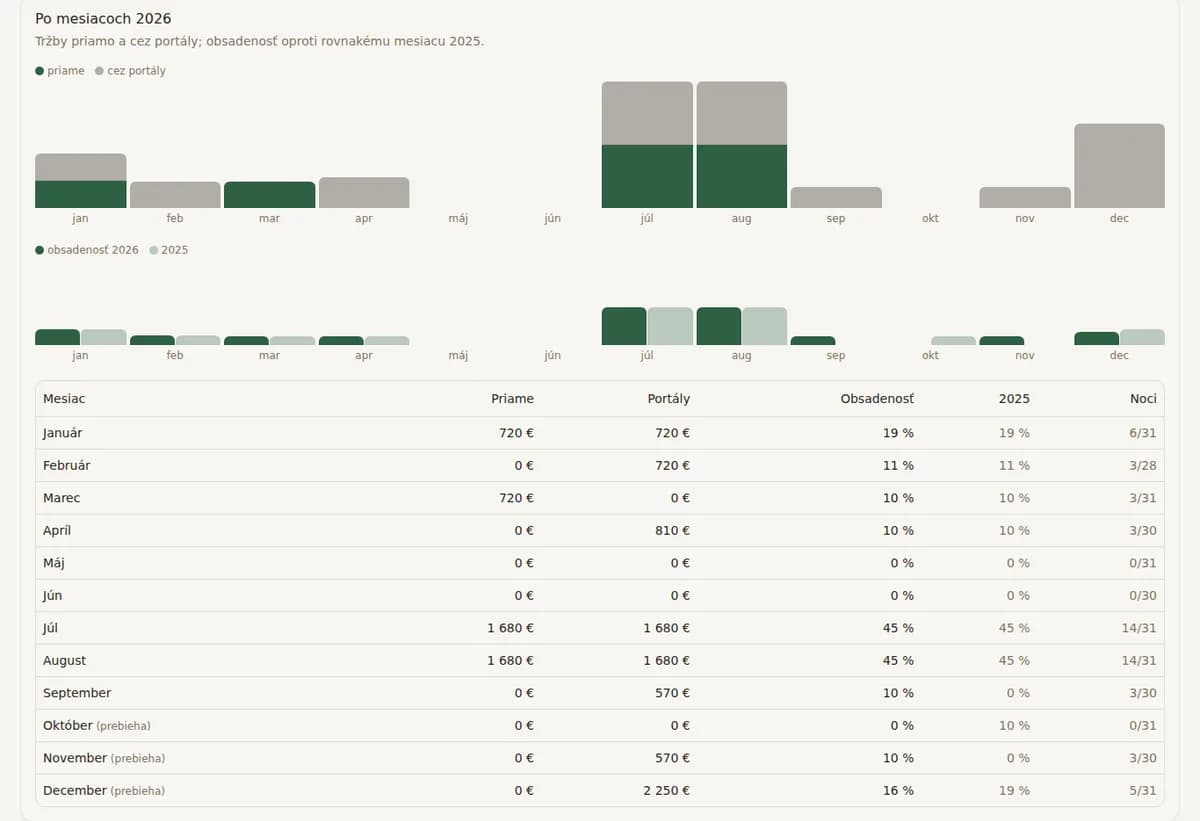
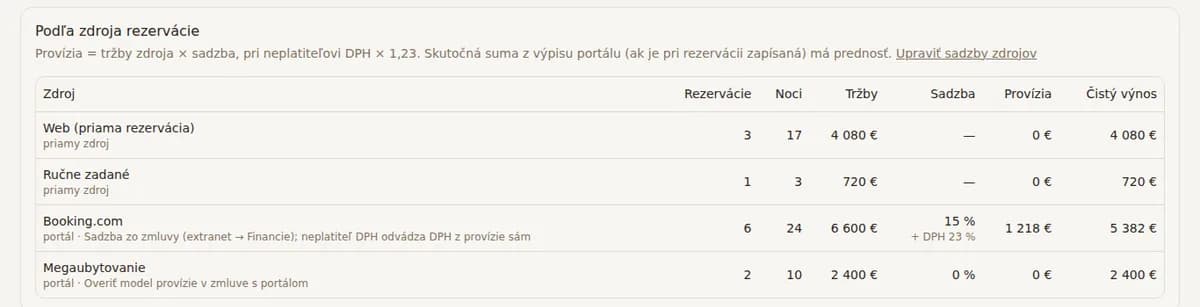
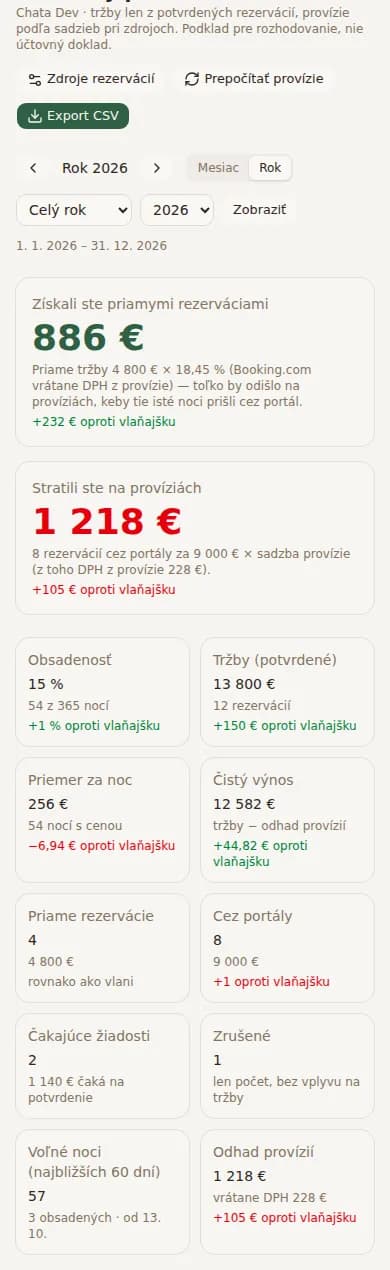
An example, not your figures Sample data, fictional guests. We are preparing the feature for all clients at no extra charge. The admin is in Slovak.
What the overview contains
One page per property and a summary for all of them
Occupancy by month
Booked nights out of available nights, comparison with the same month last year, free dates in the next 60 days.
Revenue and average price per night
Confirmed bookings only. Cancellations are shown separately as a count so they don’t distort the result.
Direct vs. via portals
Number of bookings and revenue by source: your website, Booking.com, megaubytovanie.sk, hauzi.sk, entered manually.
Estimated commission by source
For each portal you set the commission rate from your contract. You can add the actual amount from the portal statement to any booking.
VAT on commission
If you are not registered for VAT, the overview adds the 23% VAT you self-assess on a foreign portal’s commission.
Net revenue and pending requests
Revenue after estimated commission, and the list of website requests waiting for your confirmation.
Monthly overview by email
At the start of each month you receive a summary of the previous one. No need to sign in to know how the property did.
How we calculate
An open calculation from your bookings
Commission is revenue from a source multiplied by the rate you set for that source. For a host not registered for VAT, VAT on commission is added. Portal bookings that arrived through the synced calendar without a price get an estimate from your price list and are marked as an estimate until you add the price.
The overview assumes no growth in bookings and adds nothing. It shows only what is already in your admin, so you can see where your money goes.
Would you like to see what your property’s website could look like?
First you get a free preview of your website, with your property’s photos and descriptions. No obligation.
Questions
Questions about the financial overview
Step-by-step guide with sources
Booking.com commission and direct bookings: pay lessWhere does the overview get the prices of Booking.com bookings?
From the booking in your admin. If you entered the price or it came with the history import from your old system, that price is used. A booking that arrived through the synced calendar has no price, so it gets an estimate from your price list for those dates and is marked as an estimate. You can add the price at any time.
Which commission rate should I set?
The one in your contract with the portal. With Booking.com it is typically 15% or more; the exact percentage is in the extranet under Finance. Direct bookings from your website have a rate of 0.
Does the financial overview cost extra?
No. It is part of the website core and will be added for all clients at no extra charge, like every other new feature.
Does the overview replace accounting?
No. It is an overview for your decisions, not a tax document. Tourist tax figures for the municipality are handled separately in the Guest registration add-on.